The back story
Recently I have been trying to limit my use of VBA. It’s not that I was addicted and needed to go to VBA-rehab, on the contrary, I still love VBA till death do us part. But the thing is, every time someone opens an Excel sheet with VBA macros they are reminded of Excel’s vulnerability and the risks of macros.
So I set out to make workbooks that do the same thing, but without VBA. Not always is this possible, or efficient to do so. But when it’s possible, it also comes with great performance and great stability. No code needs to be changed, ever. Of course there are also downsides. It’s not as flexible as VBA, so you’re stuck in a rigid framework that solves one thing and one thing only. But it does it so well, oh my.
My latest endeavor was with permutations. I needed something that would generate all permutations of the tokens F,C,R,A (don’t ask) with repetition. As some know I am an avid speed cuber, that is solving the Rubik’s cube for speed. And the Rubik’s cube is a permutation puzzle. So I have dealt with permutations quite a lot. For those who haven’t paid attention in math class: you should know that permutations come in two flavors: with repetition (Pr) and without repetition (P). The number of permutations (Pr) in these four tokens F,C,R,A is 4^4, or 256. That number is exponential, so it grows so fast that at 5 tokens you are at 3,125 permutations and at 6 tokens at 46,656 permutations. At a set size of 10 tokens you are at 10^10 or 10,000,000,000 (ten billion) permutations. VBA would surely choke on that number of statements to follow. Excel can handle 1 million rows, although I wouldn’t put it to the test with that.
A clean slate
I started out writing a VBA program, that generates all permutations (Pr). The funny thing is if you go online and expect to find a bunch of worked out examples of algorithms, you don’t. Almost all examples you find are about permutations without repetition, which is like working with real objects, since you can’t duplicate real objects. The lottery is a good example of this. The program worked, but it was slow, and cumbersome. So let’s drop VBA and try it without.
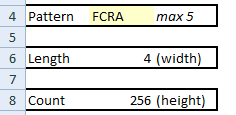 First, I set out with some settings (sheet ‘settings’). We define the pattern, and calculate the size of the set (using LEN), and the number of possible permutations (using Length^Length). These values will be used extensively in the functions to generate permutations.
The maximum length of the pattern is set to 5, which totals 3,125 permutations, an amount which Excel can handle in the blink of an eye. You could extend the grid to a width of 7, which would come to 823,543 permutations. I’d be interested to know how fast Excel would generate the output, and how big the file would become. If you try it out please let me know.
Formula frenzy
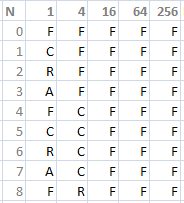 Go to the output sheet and look at the grid on the right. There you see in the top row a couple of simple formulas. They are to set the repeat cycle of that column. In the first column you see a token repeated once, in the second column 4 times, in the third column 16 times. We’re multiplying by Length to set the repeat cycle. This is an easy way to generate permutations of any set. Think of how it works with regular counting. You start with 0,1,2,3,4,5,6,7,8,9, and then go one digit to the left, and you repeat, but now in cycles of 10, so that 10,11,12,13,14,15,16,17,18,19 has exactly 10 times a 1. We’re using the same principle.
Our basic generating formula is as follows:
=MID(Pattern,MOD($D4/E$3,Length)+1,1)
If you don’t know MOD, this is a function for modulo, also called the remainder after performing division. The MID function gets a character from a specified position in the string. The column with N is simply to count and use the MOD function properly.
By using absolute referencing we are now able to copy the cell E4 to all other cells in the grid, while keeping a properly working formula. With a pattern of length 4 we can ignore the last column, which is only needed for a pattern of length 5.
In the settings sheet you will see a width and a height. By selecting the range starting at E4 with that width and height, we get exactly all permutations in the set.
Alternatively, on the left, there is a table with all tokens concatenated in one string, for ease of use. The formula for this is:
=IF(D4>=NumItems,"",LEFT(CONCATENATE(E4,F4,G4,H4,I4),Length))
Using FCRA as a pattern we can now see all 256 permutations in column A!
Perfect permutations
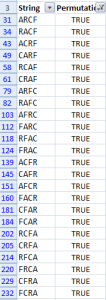 Well, permutations without repetition are actually a subset of permutations with repetition (P < Pr). In a permutation without repetition you don’t have any duplicates. So for the tokens F,C,R,A a valid Pr would be FFFF, but it’s not a member of P. You can only get a member of P by swapping original tokens. So e.g. FRCA is a member of P. That’s why the number of items in P doesn’t grow as fast as in Pr. Four tokens gets to 4*3*2*1=24 permutations. This is called a factorial.
If a token set does not contain duplicates we can easily filter out the permutations we need. E.g. in the set A,A,B,B we still get duplicates in the list, and so we can’t filter. But in F,C,R,A it’s quite possible using Excel. The formula used is a but difficult though, and requires some thought:
=SUM(IF(FREQUENCY(
  MATCH(OFFSET(E4,0,0,1,Length),OFFSET(E4,0,0,1,Length),0),
  MATCH(OFFSET(E4,0,0,1,Length),OFFSET(E4,0,0,1,Length),0))
  >0,1))=Length
Here, OFFSET gives us a dynamically defined range, which is handy, because we don’t know how long the pattern is beforehand. In this formula, Length is the size of the set (aka the length of the string). Both OFFSET and MATCH return multiple values, so it’s impossible to split the formula into more cells, but just for clarity, let’s view it in condensed form:
=SUM(IF(FREQUENCY({FFFA}, {FA})>0,1))=Length
What it does is it totals the frequencies of each character in the set, so in this case it returns 2, and then checks to see if it matches the length (4). If it matches we have a permutation. Note this only works for patterns that have no repeating tokens, like FCRA.
Using named formulas we can simplify the long formula to:
=SUM(IF(FREQUENCY(
  MATCH(tokens,tokens,0),
  MATCH(tokens,tokens,0))>0,1))=Length
…where tokens equals OFFSET(E4,0,0,1,Length)
Now we have a formula to detect permutations. Unfortunately we still have duplicates, because our table always has 5 tokens and we might have a shorter pattern, like our example FCRA. So we use an IF to detect empty cells in column A and we can now use Excel’s filter (On the ribbon choose Data, then Filter) to get all permutations.
Download
permutations with repetition (320KB)




 The Universe Divided